

You want a device that brings both power and precision to your workbench. The Kiprim DC310Pro gives you this edge with its unique blend of programmable power supply and multimeter features. Professionals and hobbyists trust it for accurate readings, versatile settings, and reliable safety. Watch the DC310Pro Video to see how this tool can help you achieve better results in your electrical projects.
Key Takeaways
-
The Kiprim DC310Pro offers a wide output range of 0V-30V and 0A-10A, making it versatile for various electronic projects.
-
High-precision measurements with up to four decimal places ensure accurate readings for voltage and current, helping you avoid mistakes.
-
Programmable settings allow you to save and recall up to 10 parameters, streamlining your workflow and saving time on repetitive tasks.
-
Built-in safety features like overvoltage and overcurrent protection keep your projects safe from unexpected issues.
-
The compact design and lightweight build make the Kiprim DC310Pro easy to transport, perfect for work in different locations.
Kiprim DC310Pro Features
Power Supply Capabilities
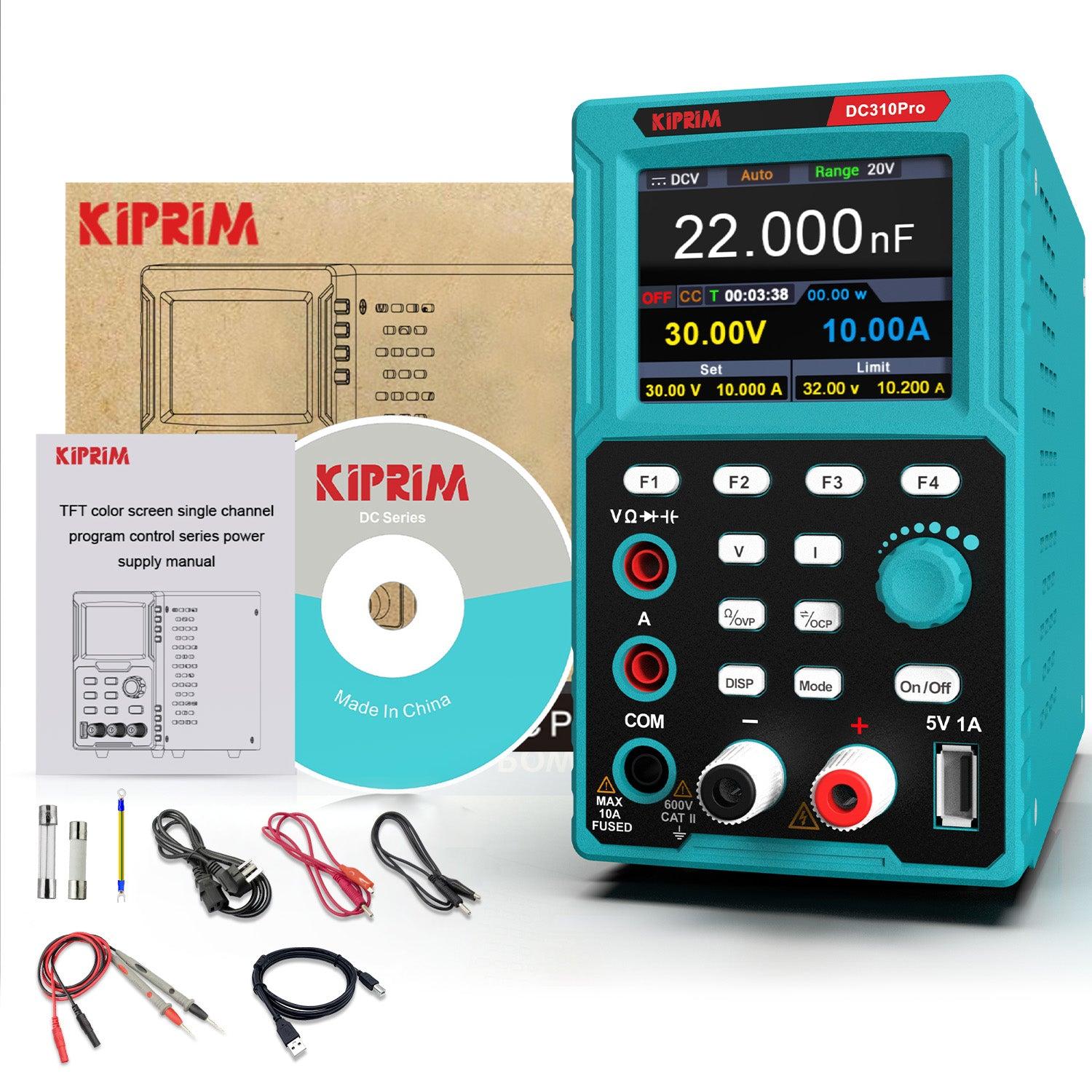
You need a power supply that adapts to your project’s demands. The Kiprim DC310Pro gives you a wide output range, so you can work with different devices and circuits.
-
Output current: 0A-10A
This flexibility lets you power small electronics or larger systems with confidence. The device maintains stable voltage and current, even when your load changes. You can rely on its smart cooling fan, which adjusts speed to keep noise low and performance high. The built-in protection features help you avoid damage and keep your workspace safe.
|
Feature |
Description |
|---|---|
|
Smart Cooling Fan |
Adjusts speed based on load, reducing noise during operation. |
|
Overvoltage Protection |
Customizable settings for protection up to 31V. |
|
Overcurrent Protection |
Customizable settings for protection up to 10.1A. |
|
Overheat Protection |
Activates at 85°C to prevent damage. |
Tip: You can set protection levels to match your project’s needs. This helps you prevent accidents and protect your equipment.
Multimeter Functions
You want accurate measurements for your electrical work. The Kiprim DC310Pro offers high-precision readings for voltage and current. You see results with up to four decimal places, which helps you spot even small changes in your circuits.
|
Measurement Type |
Range |
Accuracy Level |
|---|---|---|
|
Voltage |
0V-30V |
|
|
Current |
0A-10A |
High-Precision (4 decimal places) |
|
Resistance |
N/A |
N/A |
|
Capacitance |
N/A |
N/A |
|
Diode |
N/A |
N/A |
You can measure several electrical parameters with this device:
-
Voltage
-
Current
-
Resistance
-
Capacitance
-
Diode functionality
This range covers most tasks you face in electronics labs or workshops. The Kiprim DC310Pro matches industry benchmarks for accuracy, so you can trust your results.
Programmable Settings
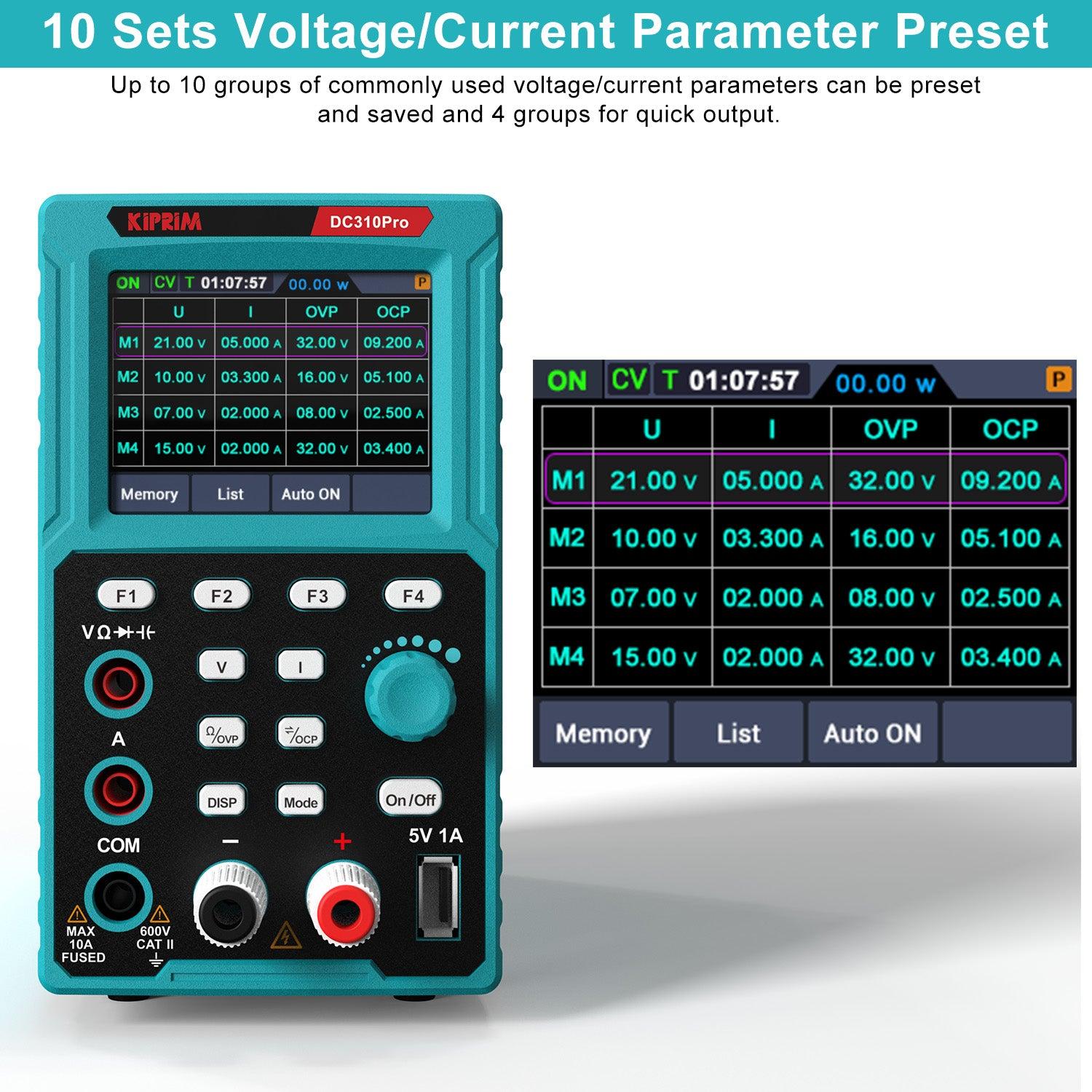
You want control and convenience when working on complex projects. The Kiprim DC310Pro lets you save and recall settings, so you can switch between tasks quickly. You can store up to 10 parameters for easy access. The device also allows you to save four sets of channel parameters (F1, F2, F3, F4), which speeds up repetitive work.
|
Feature |
Description |
|---|---|
|
Save and recall 4 sets of channel parameters (F1, F2, F3, F4) for quick output. |
|
|
Customizable Protection Settings |
Overvoltage (0-31V), overcurrent (0-10.1A), and overheat (85°C) protections are adjustable. |
|
Output Enable/Disable Button |
Allows toggling of output settings without affecting the power supply adjustments. |
|
Computer Connectivity |
Connect via USB for software upgrades and enhanced control. |
You can connect the power supply to your computer for easy control and upgrades. This feature helps you automate tests and keep your device up to date.
|
Feature |
Benefit |
|---|---|
|
Memory Function |
Save up to 10 parameters for easy recall. |
|
Channel Parameters |
Easily save and recall 4 sets of channel parameters (F1, F2, F3, F4). |
|
Computer Control |
Connect the power supply to your computer for easy control and upgrades. |
Note: Programmable settings make your workflow smoother. You spend less time adjusting and more time testing.
Precision and Control

High-Resolution Display
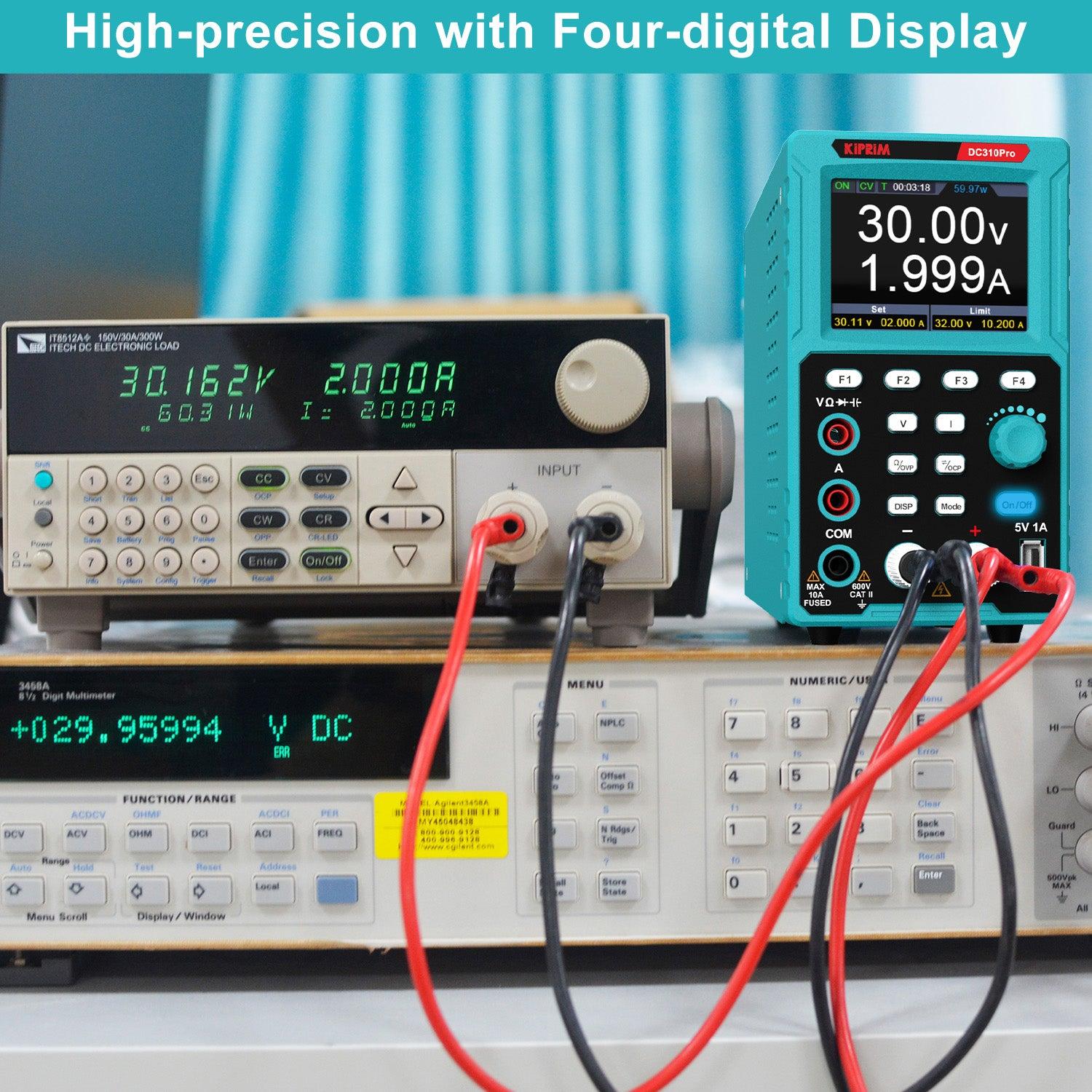
You need a clear view of your data when working on electrical projects. The Kiprim DC310Pro features a 2.8-inch color LCD display that shows all the important information you need. You can see voltage, current, output power, and even the total operating time at a glance. This high-resolution screen helps you track every detail of your project. You do not have to guess or check multiple devices. Everything appears in one place, making your work faster and more accurate.
Tip: The display updates in real time, so you always know the exact status of your circuit.
Accurate Measurements
Accuracy matters when you test or build circuits. The Kiprim DC310Pro gives you precise readings for voltage and current, showing results up to four decimal places. This level of detail helps you spot small changes that could affect your project. You can trust the numbers you see, whether you are testing a new design or troubleshooting a problem.
-
Voltage readings: 0V to 30V
-
Current readings: 0A to 10A
You can measure resistance, capacitance, and diode function as well. This range covers most tasks you face in electronics labs or at home. The device matches industry standards for accuracy, so you get reliable results every time.
User Interface
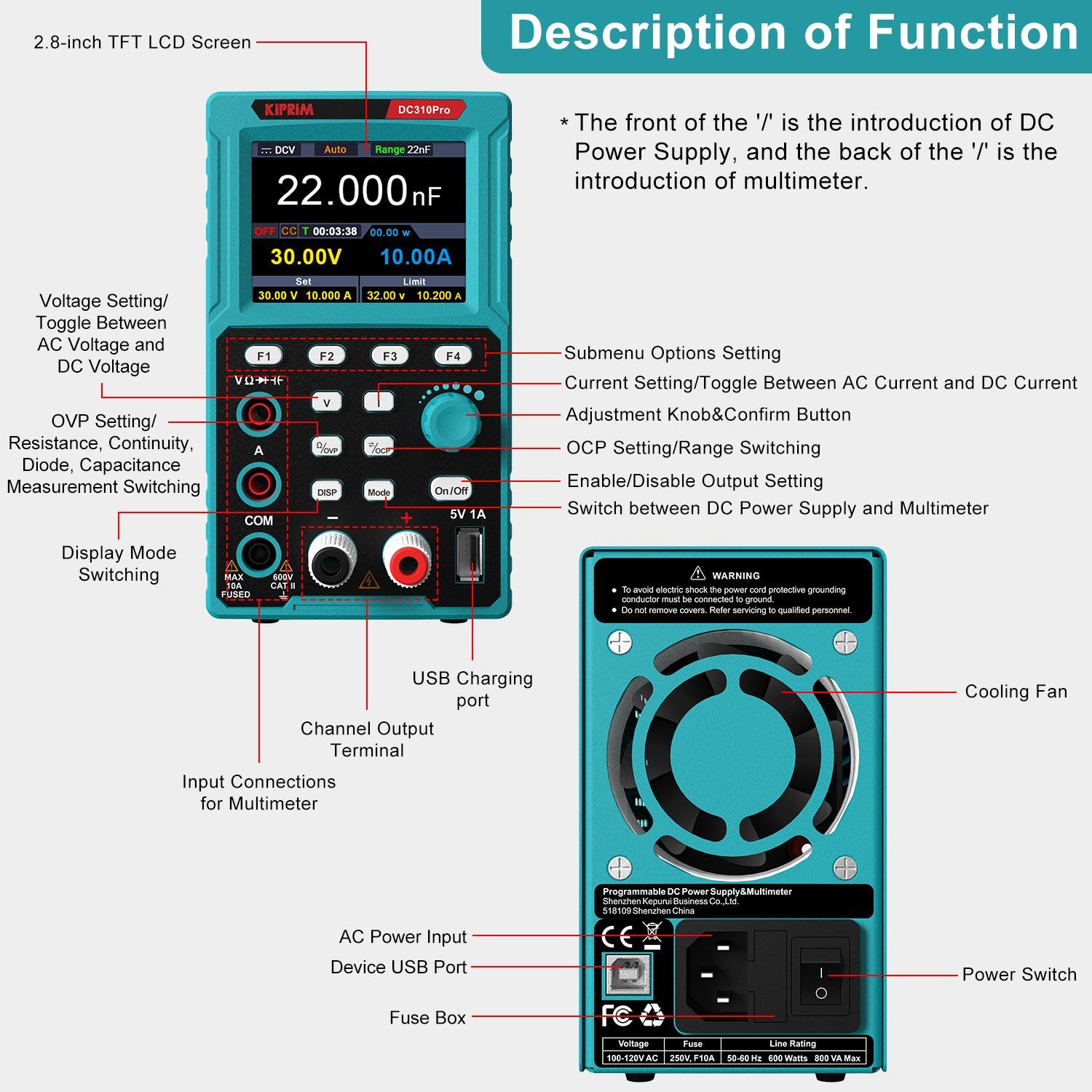
You want a tool that is easy to use. The Kiprim DC310Pro has a simple and intuitive interface. You can navigate menus quickly using the front panel buttons and rotary knob. The layout groups all controls logically, so you do not waste time searching for settings. You can save and recall your favorite parameters with just a few clicks. This feature helps you work efficiently, especially when you repeat similar tests.
|
Feature |
Benefit |
|---|---|
|
Rotary Knob |
Fast and precise adjustments |
|
Memory Buttons |
Quick access to saved settings |
|
Clear Menu Structure |
Easy navigation |
Note: A user-friendly interface lets you focus on your project, not on learning how to use the device.
Safety and Reliability

Protection Mechanisms
You want to protect your projects and equipment from unexpected problems. The Kiprim DC310Pro gives you several built-in safety features that help you work with confidence. You can set overvoltage, overcurrent, and overheat protection levels to match your needs. If the device detects a problem, it reacts quickly to prevent damage.
-
Overvoltage Protection: The power supply stops output if the voltage goes above your set limit.
-
Overcurrent Protection: The device cuts off power if the current exceeds your chosen threshold.
-
Overheat Protection: The system shuts down if the internal temperature reaches 85°C.
These features help you avoid accidents and keep your workspace safe. You do not have to worry about sudden spikes or overheating. The device monitors itself and your circuit at all times.
Tip: Set your protection levels before you start a new project. This step helps you avoid costly mistakes.
|
Protection Type |
User Adjustable |
Automatic Response |
|---|---|---|
|
Overvoltage |
Yes |
Yes |
|
Overcurrent |
Yes |
Yes |
|
Overheat |
Yes |
Yes |
Smart Cooling
You need a device that stays cool during long work sessions. The smart cooling system in this power supply uses a fan that changes speed based on the load. When you use more power, the fan spins faster to keep the device cool. When you use less power, the fan slows down, which reduces noise.
This smart cooling design helps the device last longer. You get a quiet workspace and a reliable tool for every project. You can focus on your work without worrying about overheating or loud fans.
Note: A cool device works better and lasts longer. Smart cooling protects your investment.
Portability and Versatility
Compact Design
You want a tool that fits easily into your workspace or bag. The Kiprim DC310Pro offers a compact design that saves space and adds convenience. The device measures only 8.9 x 5.6 x 3.2 inches and weighs just 3.3 pounds. You can carry it to different job sites or move it around your home lab without effort.
-
Small size makes storage simple.
-
Lightweight build helps you transport it anywhere.
-
Sturdy construction protects the device during travel.
You do not need a large bench to use this power supply. You can set it up on a small desk or shelf. The compact design also means you can keep your workspace organized and clutter-free.
Tip: If you work in different locations, you will appreciate how easy it is to pack and unpack this device.
USB Charging
You often need to charge your phone or other devices while working. The built-in USB charging port on this power supply gives you extra flexibility. The port delivers 5V at 1A, which is enough to charge most smartphones and small gadgets.
|
Feature |
Benefit |
|---|---|
|
USB Port |
Charge mobile devices easily |
|
5V 1A Output |
Supports most smartphones |
You can keep your devices powered up without needing extra outlets or chargers. This feature helps you stay focused on your projects because you do not have to leave your workspace to find a charger.
Note: The USB charging port works even when you use the main power supply functions. You get more done with fewer interruptions.
The Kiprim DC310Pro combines portability and versatility to support your work wherever you go. You can rely on its smart design and useful features to make every project easier.
Real-World Use
User Feedback
You see the Kiprim DC310Pro in action across many workbenches. Professionals use it to test and repair electronic devices. You can set precise voltage and current levels, which helps you avoid mistakes when working with sensitive components. Hobbyists rely on it for building and troubleshooting DIY projects. You save time by recalling stored settings for repeated tests.
Many users mention the clear display and easy controls. You adjust parameters quickly, even if you are new to programmable power supplies. One electronics engineer shared that the memory function helped him run multiple tests without resetting values each time. A student said she used the device to power her robotics project and monitor current draw, which made her work safer and more accurate.
Tip: You can join online forums to read more reviews and see how others use the device for creative projects.
Comparison
You want to know how the Kiprim DC310Pro stands out from other power supplies and multimeters. Many devices offer basic voltage and current control, but few combine both functions in one compact unit. You get a high-resolution color display, which is rare in similar products. The programmable memory and USB connectivity make your workflow smoother.
Here is a quick comparison:
|
Feature |
Kiprim DC310Pro |
Standard Power Supply |
Basic Multimeter |
|---|---|---|---|
|
Programmable Output |
Yes |
Limited |
No |
|
High-Res Color Display |
Yes |
No |
No |
|
Memory Function |
Yes |
No |
No |
|
USB Charging Port |
Yes |
No |
No |
|
Safety Protections |
Advanced |
Basic |
Basic |
You see that the Kiprim DC310Pro gives you more control and flexibility. You can use it for both testing and powering devices, which saves space and money. The advanced safety features protect your projects better than most alternatives.
You want a tool that delivers both accuracy and flexibility. The Kiprim DC310Pro gives you advanced features that help you achieve better results in every project. You can trust its high-precision measurements and smart safety systems.
When you add this device to your toolkit, you gain:
Reliable power and measurement in one unit
Easy-to-use controls for fast setup
Portability for work anywhere
Consider this power supply as a smart investment for your electrical work.
FAQ
How do you save and recall settings on the Kiprim DC310Pro?
You press the memory button to save your current settings. To recall a saved setting, press the same button again. This feature helps you switch between projects quickly.
Can you use the Kiprim DC310Pro for both testing and powering devices?
Yes, you can use it as a power supply and as a multimeter. You test circuits, measure voltage or current, and power your devices—all with one tool.
What safety features protect your projects?
The DC310Pro includes overvoltage, overcurrent, and overheat protection. These features help you avoid damage to your circuits and keep your workspace safe.
Is the Kiprim DC310Pro easy to carry?
You can carry it easily. The device weighs only 3.3 pounds and measures 8.9 x 5.6 x 3.2 inches. Its compact size fits most bags or toolboxes.
See Also
Simplify Your Projects With The Kiprims DC310S Power Supply
Revolutionize Electronics Testing With A Reliable DC Power Supply
0 comments